


FreeTone Calls & Texting
4.127.36K Reviews
App Specs
- Version
- 3.55.0
- Updated On
- License
- Free
- Downloads
- 10,000,000+
- Developer
- TextMe, Inc.
- Categories
- Social
- Platform
- Android, iOS
Screenshots
 Analysis by AppCompare
I’m usually cautious about free calling apps because the setup can be less straightforward than the headline suggests. With FreeTone Calls & Texting, the key question is whether its separate phone number and internet-based calling fit the way you already communicate. I see it as a practical extra line for people who regularly contact the US or Canada, rather than an automatic replacement for a normal mobile plan.
Where people can get stuck
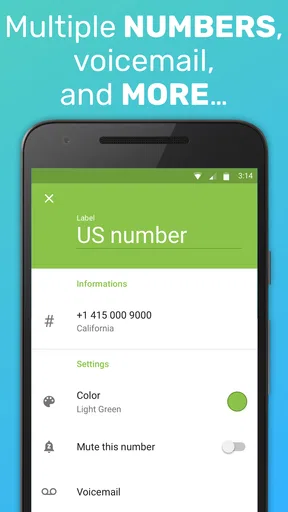
The first decision is not about call quality; it is about what number you want other people to reach. FreeTone provides a phone number for calling and messaging, so it helps to decide whether you want that number for personal conversations, a side project, or a limited group of contacts. Keeping its purpose clear makes replies easier to recognize and avoids mixing every conversation into one channel.
It is also worth remembering that “free” describes the basic calling and texting offer, not necessarily every possible use. The app is free to download, but it includes in-app purchases, with items ranging from $0.99 to $79.99. I would treat optional purchases as a choice to consider only after checking what you actually need, rather than assuming that every kind of call or extra is covered at no cost.
FreeTone is a social communication app from TextMe, Inc. It has an average rating of 4.2 from around 131,000 ratings, and it has been installed over 10 million times. Those figures suggest that it has found a sizeable audience, but they do not guarantee that it will suit your particular phone, network, or calling habits. I’d test it with a short conversation before relying on it for an important call.
Setup checks that save time
The app is listed for Android and iOS, and the Android version is 3.51.0, with Android 7.0 or later required. Before installing, I’d check that the device meets that minimum and that there is enough room to complete the download. The age rating is Everyone, which makes the app broadly accessible, though younger users should still have an adult help them think through who they share a phone number with.
After setup, check that the number shown in the app is the one you intend to give out. Then make a small, low-stakes test: send a text to someone you trust and ask them to reply, followed by a brief call. This simple sequence helps separate an account or number setup issue from a problem that appears only during calls.
If contacts do not appear as expected, try looking up one person by entering their number rather than assuming the contact list has synced correctly. This is a useful first check before changing settings or reinstalling anything. I would also keep the recipient’s number in the format they normally use and confirm it carefully; a wrong digit can look like a messaging failure when the real issue is just the destination.
Worth Reading Before You Choose

EA SPORTS FC Mobile 26 Is a Bigger Football Game, but It Takes Time

Flipboard Shows What News Apps Must Do Beyond the Feed

Switching to Android Auto Means Rethinking Your Driving Routine

Google Calendar Makes a Crowded Week Easier to Manage

Ludo King Makes the Most of the Minutes Between Plans

Baby Panda World Brings Quick Play to Modern Phones, but Its Game Library Feels Busy
Recovering a conversation without guesswork
When a call does not connect, I would avoid repeating it rapidly. First, check whether the app is still open and responsive, then try a short text to the same person. If the text works but the call does not, you have narrowed the issue to the call path rather than losing access to the conversation altogether. If neither works, test with a different contact before concluding that the app itself is at fault.
For a message that seems delayed, confirm the recipient and give the connection a moment before sending several copies. Duplicate messages can make a small delay confusing for both people. A practical habit is to send one clear check-in, wait for a response, and use another channel only if the message is time-sensitive.
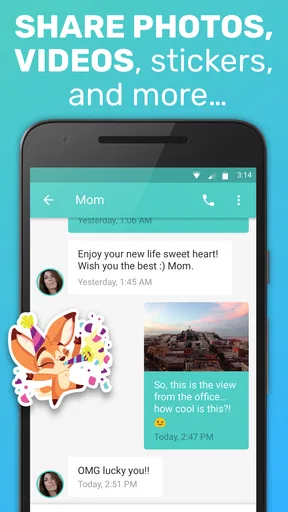
Pictures and emojis can make messages feel more personal, but a plain text is a better first test when something is going wrong. It is easier to tell whether the basic messaging route works without adding a media attachment to the troubleshooting. Once simple messages go through, try a picture separately if that is what you need to send.
When the app may not be the cause
Calling and messaging depend on a working internet connection, so the same app can behave differently on a strong Wi-Fi connection and on mobile data. If a call sounds choppy or fails to connect, try again from a place with a steadier connection, or switch between Wi-Fi and mobile data if both are available. That is a sensible check before blaming the recipient’s phone or changing your setup.
The other person’s availability matters too. A powered-off phone, missed notification, or unavailable recipient can look like a problem on your end. I find it useful to distinguish between “the call did not connect” and “the person did not answer”; they are not the same result. A short text asking when they can talk is often more useful than repeatedly redialing.
For urgent communication, I would keep a second way to reach someone. FreeTone can be handy as an additional route, but no internet-based app should be the only plan for contacting someone in an emergency or during a network disruption. That is a general reliability choice, not a special flaw in this app.
Features That Catch Your Eye
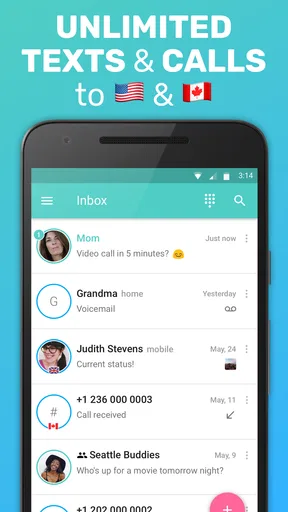
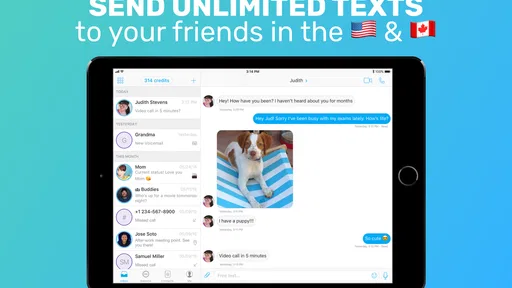
The first thing you’ll notice about FreeTone Calls & Texting is its clean and intuitive interface. It’s super user-friendly, which means you don’t have to be a tech wizard to get started. Just a few taps, and you’re good to go. The app offers free calls and texts to any number in the US and Canada, which is a huge plus if you’ve got friends and family across the border.
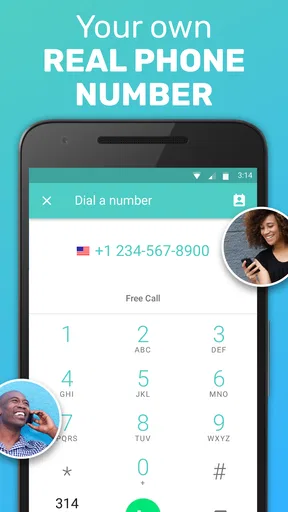
One of the features I found really cool is the ability to earn credits for international calls. You can watch videos or complete simple tasks to rack up these credits. It’s a neat way to keep those long-distance relationships alive without spending a dime. Plus, the app gives you a real phone number that you can use for texting and calling, making it super convenient.
Quality of Calls
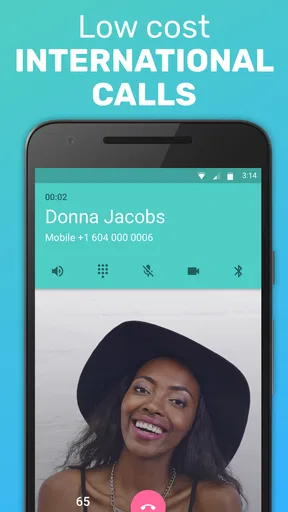
Now, let’s talk about call quality. I was pleasantly surprised by how clear the calls were. None of that annoying static or dropped calls you sometimes get with similar apps. The connection was stable, and I could hear the person on the other end perfectly. It’s almost like talking on a regular phone line, which is pretty impressive for a free service.
Texting is just as smooth. Messages are sent and received quickly, and I didn’t experience any delays. You can also send pictures and emojis, which adds a fun touch to your conversations.
Customization and Fun
The app also offers some fun customization options. You can choose from a variety of ringtones and notification sounds, which is a nice touch. It allows you to add a bit of personality to your experience. Who doesn’t love a little customization, right?
And for those who love to keep things organized, the app lets you easily manage your contacts and call history. Everything is laid out neatly, so you won’t have any trouble finding what you need.
Easy Setup and Accessibility
Setting up the app is a breeze. You just download it from the App Store or Google Play, follow the simple setup instructions, and you’re off to the races. It’s compatible with both Android and iOS, so no one’s left out of the fun.
One thing I found particularly useful is the ability to sync the app with your existing contacts. This makes it super easy to start a conversation without having to manually enter numbers. So, whether you’re on a Wi-Fi network or using your mobile data, FreeTone Calls & Texting has got you covered.
Choosing it for the right kind of contact
The app makes the most sense for someone who wants a separate number for everyday conversations and often reaches people in the US or Canada. For example, imagine coordinating a weekend visit with a relative across the border: you can use the app’s number to arrange timing by text, then switch to a call when plans change. That keeps the conversation in one place without making your regular number the only way to reach you.
It can also suit a small personal project where you would rather share a dedicated contact number than your main one. I would still be selective about where I post it. A second number is useful for separating conversations, but it does not by itself guarantee privacy or prevent unwanted contact. Share it with the people who need it, and review your conversation history when you need to find a detail later.
For someone who mainly communicates through group chats, video calls, or a messaging service their whole family already uses, FreeTone may add another inbox without solving a real problem. The usual alternatives can be more convenient when everyone is already on the same platform, while a carrier number may be simpler for people who want their calls and texts tied directly to their mobile service. I’d choose FreeTone when a separate number and US/Canada communication are the point, not just because another calling app is available.
Small habits that make it easier to use
I would save the app’s number in a trusted contact’s phone under a clear name and ask them to do the same. That makes an incoming call easier to identify and reduces the chance that a new number is ignored. For ongoing conversations, agree on which number you will use; switching between a regular line and an app number without warning can leave someone replying in the wrong place.
There is also a useful distinction between routine and important messages. A casual plan or check-in is a good way to get comfortable with the app. For a time-sensitive detail, such as a pickup change, I would ask for a confirmation rather than assume that a sent message has been read. That is sensible with any messaging service, but especially helpful when the recipient may not recognize the number yet.
If international calling is the reason you are considering it, take a moment to understand the credit workflow before making it part of your routine. The app’s existing description points to earning credits through videos or simple tasks, so the trade-off is time and attention rather than a completely hands-off experience. I would see that as an occasional option for a call that matters, not a promise that every overseas conversation will feel effortless or cost nothing.
What I would expect from the experience
FreeTone’s strongest appeal is practical: a phone number, calls, and messages gathered in one app, with a free route for contacting US and Canadian numbers. That is a different proposition from a social network built around feeds or from a chat app that works best only when both people have accounts on the same service. The recipient-facing phone number can make it easier to reach people who are accustomed to ordinary calls and texts.
That convenience has a trade-off. An app-based line depends on the phone and connection being available, and it is another place to check for messages. If you need a single, dependable number for work, account recovery, or critical contacts, I would not move everything over without testing it carefully first. Keep the number you already rely on until you know this one behaves well for your own routine.
The free download makes trying it a relatively low-commitment decision, but optional purchases mean it is sensible to pause before spending. I would first see whether the basic calling and messaging cover the specific people and situations I have in mind. If they do, there may be no reason to buy anything; if a feature or calling need leads you toward a purchase, check the in-app details and decide whether the value is clear to you.
Final Thoughts
All in all, I’d say FreeTone Calls & Texting is a solid choice if you’re looking for a reliable and cost-effective way to stay in touch. It’s packed with features that make communication easy and enjoyable. Whether you’re calling your best friend or texting a family member overseas, this app makes it simple and affordable.
So, if you haven’t already, give it a shot. It’s free to download, and you might just find it becomes your go-to app for calls and texting. Happy chatting!
My practical verdict
I would try FreeTone as a supplementary line if I wanted a straightforward way to call and text people in the US or Canada, and I would judge it by a few ordinary conversations rather than one perfect first call. Its broad reach is reflected in an average rating of 4.2 and over 10 million installs, but my recommendation depends on whether the number fits your habits and whether your connection is dependable where you use it.
It is not the best fit if you need guaranteed emergency access, dislike managing a second inbox, or expect every international call to be free without any effort. The app is rated Everyone and is free to install, while optional in-app purchases are available. For me, the sensible approach is to start with basic use, keep another contact method for urgent situations, and spend only if a clearly useful need comes up.
Pros
- High-quality voice calls over Wi-Fi.
- Free texting to any number in the US.
- User-friendly interface design.
- No hidden fees or charges.
- Supports multimedia messaging.
Cons
- Ads can interrupt user experience.
- Limited free calling credits.
- International calls are not free.
- Requires internet connection.
- In-app purchases can be pricey.
FAQs for FreeTone Calls & Texting
What features does FreeTone Calls & Texting offer?
FreeTone provides free calls and texts to U.S. and Canadian numbers, allowing users to communicate without incurring traditional phone charges. The app also offers a real phone number, voicemail, and the ability to send picture messages. Premium features, such as ad-free usage and international calls, are available via in-app purchases.
Is FreeTone Calls & Texting truly free to use?
Yes, FreeTone offers free calls and texts to U.S. and Canadian numbers. However, some features, like ad removal and international calling, require in-app purchases. The app is supported by ads, so users can enjoy free basic services, but for a more enhanced experience, upgrading might be necessary.
How reliable is the call quality on FreeTone?
FreeTone generally provides good call quality, similar to other VoIP services. However, the quality largely depends on your internet connection. A stable Wi-Fi or mobile data connection is essential for optimal performance. Users may experience occasional drops or lag if their connection is unstable.
Can I use FreeTone on multiple devices?
FreeTone can be installed on multiple devices, but it is designed to work on one device at a time per account. You can log in using the same credentials, but calls and texts will be directed to the device currently logged in, which might require frequent logins if switching devices often.
Is FreeTone safe and secure to use?
FreeTone takes user privacy seriously, adhering to standard security protocols to protect user data. However, as with any app, it's important to review their privacy policy. Using secure networks and keeping the app updated are recommended practices to ensure your data remains safe while using the service.


